Making Campaign Blockers Actionable
I turned a request for a separate missing-information queue into a scalable line item workflow, making campaign blockers visible and actionable, reducing partner messages by 32% and campaign setup time from weeks to approximately two days.
Role
Sole Product Designer
Team
Product, Engineering, Operations, and external stakeholders
Timeline
2025–2026
Product
Ui Marketing, a B2B advertising OMS used by 500+ partner companies

Overview
Campaign setup depended on information moving across internal Operations teams, partner administrators, and advertisers. One order could contain multiple line items, each with different requirements, owners, and states.
Operations teams were opening items one by one, identifying missing fields, composing follow-ups, and entering responses back into the platform. The original request was to add a dedicated queue for missing information.
How might the existing workflow make it immediately clear what is missing, who needs to act, and what happens next?
I reframed the request into a connected workflow: the existing line item table became the triage layer, automated handoffs requested missing information, and a white-labeled form gave external contributors a focused way to respond.
The system was hiding the real blocker
A campaign life cycle spans months and crosses many roles, related records, and responsibilities. An order-level “missing information” status could signal that something was wrong, but it could not explain which campaign item was blocked, what was missing, or who needed to respond.
I reviewed project requests, shadowed Operations, and mapped campaign states, role handoffs, and repeated manual actions. The recurring problem was a lack of shared visibility into ownership, dependencies, and next steps.
Design challenge
Reduce the manual work of finding and resolving blockers without asking experienced users to relearn the workflow they used every day.

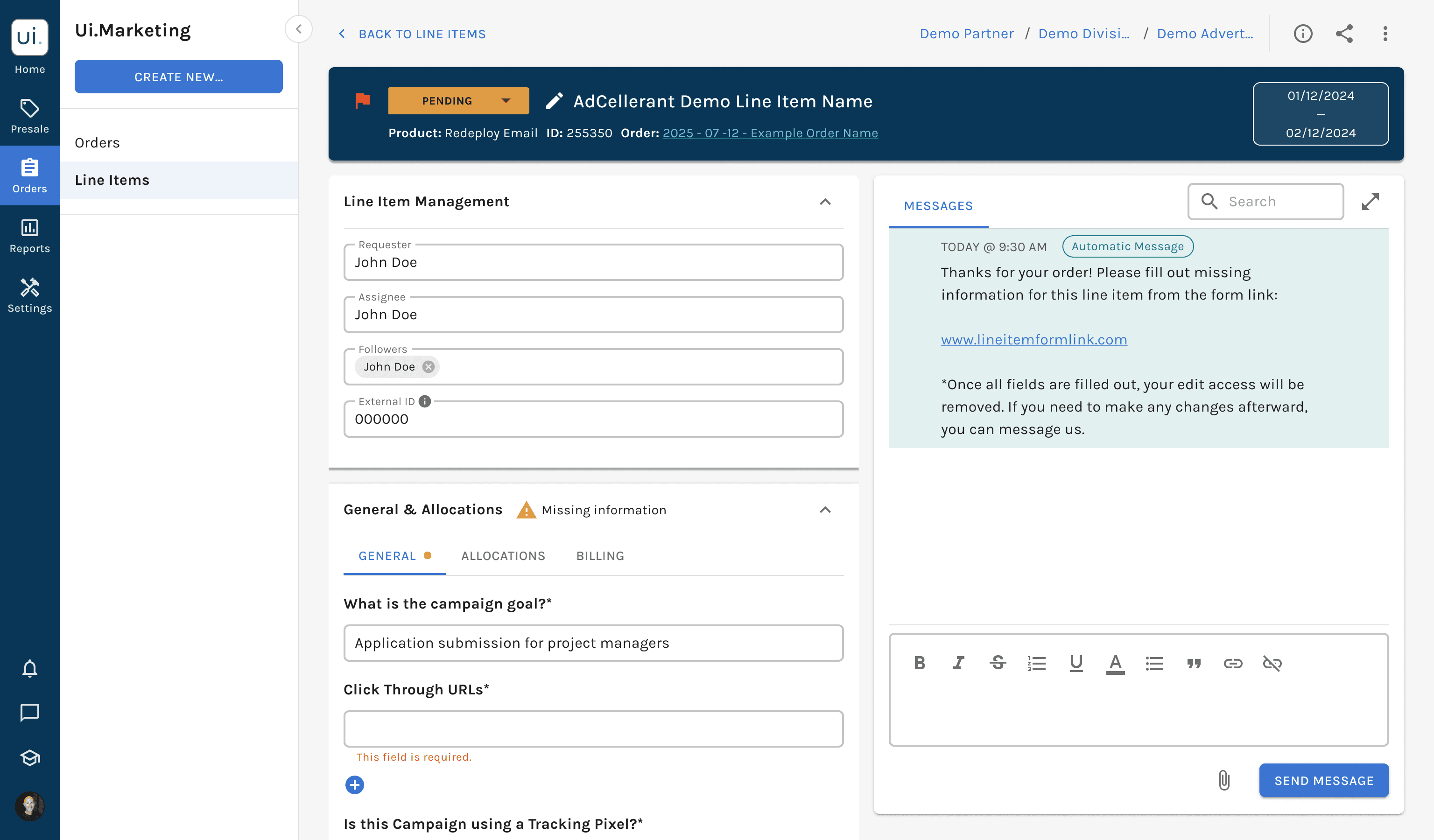
Decision 1: Make the line item the unit of work
The most consequential decision was choosing the right level for tracking a blocker. Orders were familiar but too coarse; individual missing fields exposed every gap but detached work from campaign context.
I chose the line item as the primary tracking unit. It was granular enough to expose the real blocker while preserving the requirements, status, detail, and conversation users needed to resolve it.
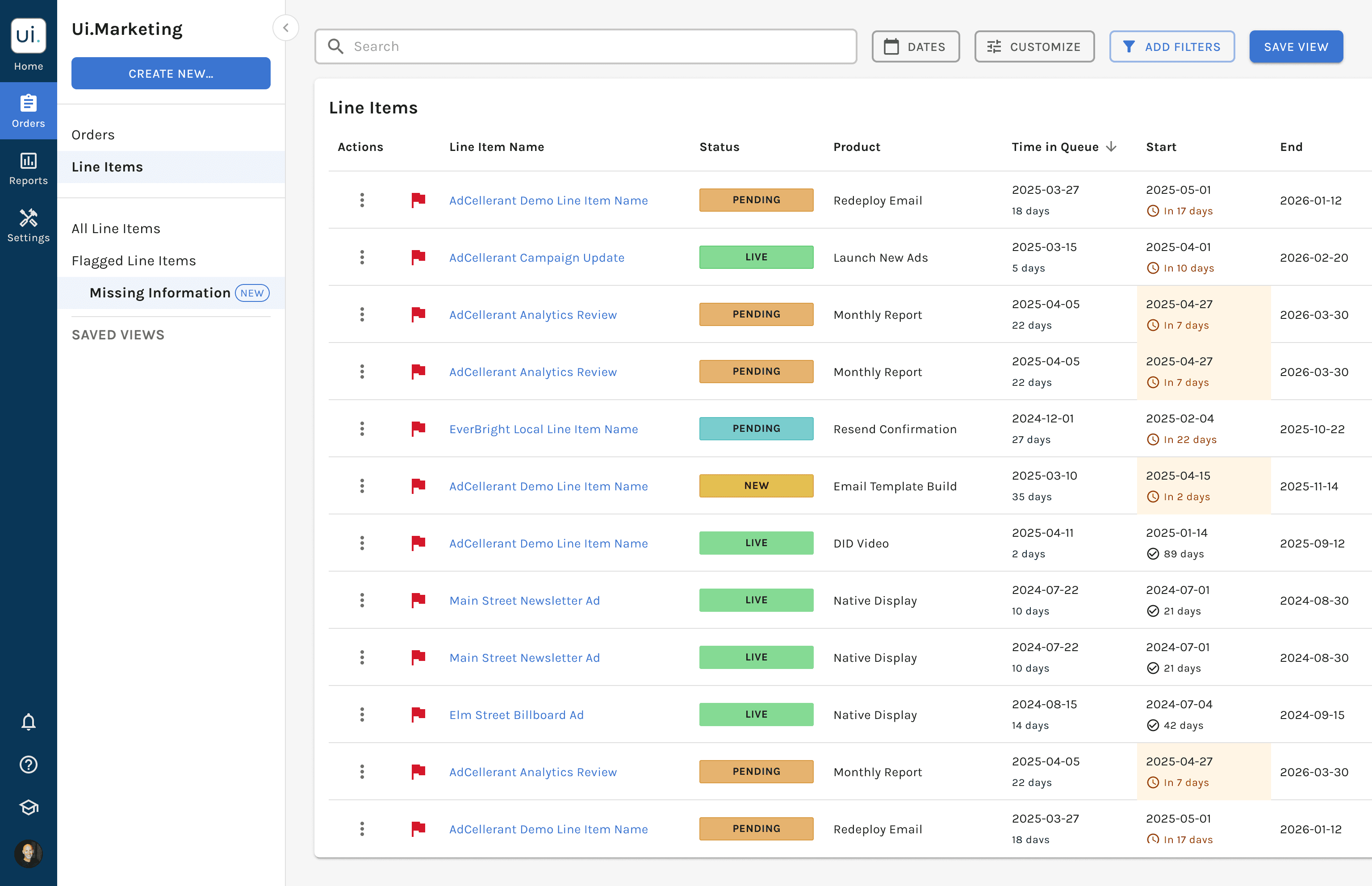
Decision 2: Strengthen the source of truth instead of creating a parallel queue
A separate queue would duplicate campaign information, split attention, and create uncertainty about where work should happen. I proposed turning the existing line item table into an action-focused worklist.
Product raised a valid concern: missing information was not prominent enough in the current table. That sharpened the goal—to preserve one source of truth while making unresolved work impossible to miss.
“Starts in X days” made launch urgency visible.
“X days with missing information” exposed how long a blocker had been unresolved.
The number of missing fields communicated scope without creating one internal task per field.
Owner-based filtering helped each Operations user focus on the line items they managed.


Decision 3: Separate triage from resolution
Operations needed full campaign context—line item, timing, status, owner, missing-field count, and history. Advertisers only needed to understand what information was requested and provide it safely.
Triage: Operations scans the line item worklist and identifies the blocker.
Handoff: An automated message or reminder requests the missing information.
Resolution: The recipient opens a white-labeled, shareable form with clear markers beside incomplete fields.
System update: Flags and statuses change automatically for common transitions.
Visibility: Notifications and a history log keep Operations aware of external activity.
The external form organized the task around what the recipient needed to provide rather than the platform’s internal categories. This reduced complexity for contributors without stripping Operations of control or context.

Testing changed two assumptions
Automation still needed visibility
My first direction assumed Operations did not need to be involved while partners and advertisers completed the missing information. Testing with Operations and Product showed that this was too opaque.
Managers remained accountable for delivery and needed to know what external users had done and when. I added Operations notifications and a history log so automation reduced repetitive work without turning the process into a black box.

External contribution needed a boundary
I also explored letting external users edit the line item form directly in the platform. That would have avoided a separate form, but Operations identified a risk: outside edits could affect the internal working record.
The shareable form created a controlled boundary between information collection and campaign management. It also preserved the partner’s branded relationship with the advertiser.


A data model constraint shaped the UI
The shareable form raised a deeper question: should fields be grouped as required versus optional? That distinction would improve prioritization, but Engineering pointed out that the system did not yet have reliable rules for every advertising product.
Operations confirmed that requirements varied and were already a source of clarification work. I treated this as a phased product decision:
Simple solution for now: bring missing fields together so users can find and resolve them.
Long-term solution: distinguish required and optional fields once the underlying product rules are defined.
This kept the immediate experience useful without using visual labels to hide an unresolved data-model problem.
Tradeoffs I optimized for
Tradeoff | Decision |
|---|---|
New queue vs. existing workflow | Reused the line item table and detail path to preserve one internal source of truth. |
Order-level simplicity vs. item-level actionability | Tracked work by line item so users could see the actual blocker in context. |
Direct external editing vs. control | Used a shareable form to protect the internal working record. |
Automation vs. operational awareness | Automated routine transitions while retaining notifications, history, and manual control for exceptions. |
Immediate clarity vs. unsupported precision | Deferred required/optional labels until the product rules could support them reliably. |
Crafting the interaction in Figma
I worked directly from early workflow concepts through detailed, production-ready states. The craft challenge was expressing a complex system clearly so users could scan, decide, and act.
Table hierarchy for urgency, ownership, and blocker severity.
Status, flag, and notification components across multiple states.
Form and field behavior for internal and external contributors.
Outcome
An Operations-focused line item view.
Automated messages and notifications.
A white-labeled shareable form with missing-field markers.
Automated flag and status changes.
A history log for operational visibility.
Operations reported spending less time manually checking line items, compiling requests, and relaying answers back into the platform. Partner messages decreased by 32%, and campaign setup time fell from weeks to approximately two days.
Reflection
Simplifying a system does not always mean removing complexity.
The higher-leverage move was to expose the right relationships, states, and next actions, while protecting users from complexity they did not need. Choosing the right unit of action, preserving the existing source of truth, and automating handoffs without hiding them created a workflow that could scale.